Process Hacker

Advanced Process Monitor for Windows

A free, powerful, multi-purpose tool that helps you monitor system resources, debug software, and detect malware. Trusted by over 18,000 weekly downloads worldwide.

100% Free & Open Source
No Registration Required
Trusted by 18,530+ Users
Official Process Hacker Website
Verified Official Source
18,530+
Weekly Downloads
Active users worldwide
4.7/5
User Rating
From 138+ reviews
100%
Free & Open Source
GPL v3 licensed
15+
Years Active
Since 2008
Official Features

Powerful Features

Discover why thousands of users trust Process Hacker for system monitoring, debugging, and security

Process Monitoring

Process Monitoring

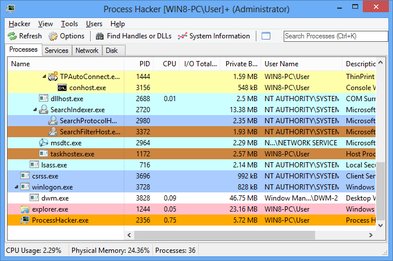
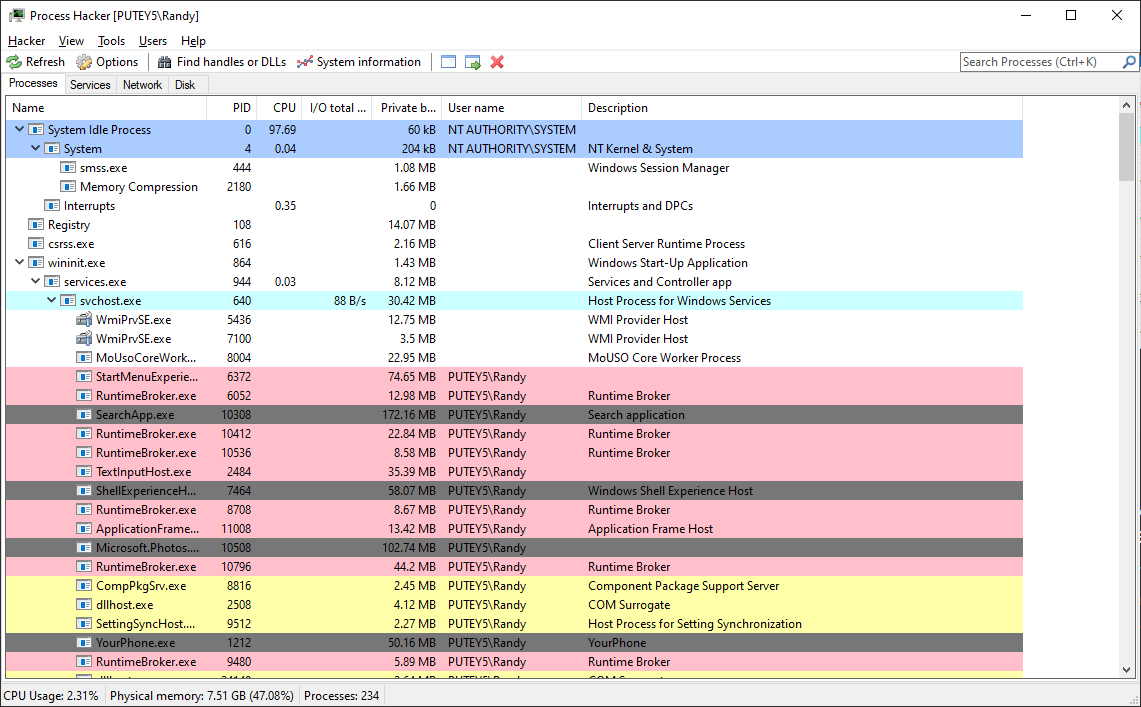
Get a detailed overview of all running processes with real-time resource usage, CPU, memory, and disk activity monitoring. View process trees, filter by resource usage, and identify resource-intensive applications instantly.

  • Real-time CPU, memory, and disk usage
  • Process tree visualization
  • Advanced filtering and search
Malware Detection

Malware Detection

Identify suspicious processes and detect malware with advanced system monitoring and process analysis capabilities. Detect hidden processes, rootkits, and suspicious network activity that traditional antivirus might miss.

  • Hidden process detection
  • Suspicious activity monitoring
  • Digital signature verification
Network Monitoring

Network Monitoring

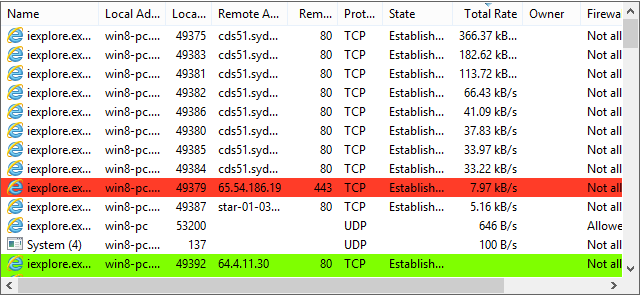
View active network connections, identify which processes are using your network, and close connections if needed. Monitor TCP and UDP connections in real-time with detailed connection information.

  • TCP/UDP connection monitoring
  • Process-to-port mapping
  • Remote IP identification
Service Management

Service Management

Create, edit, and control Windows services beyond what services.msc offers. Full service management capabilities including dependency management, startup type configuration, and service properties editing.

  • Full service control
  • Service creation and editing
  • Dependency management
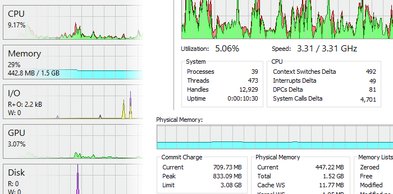
System Graphs

System Graphs

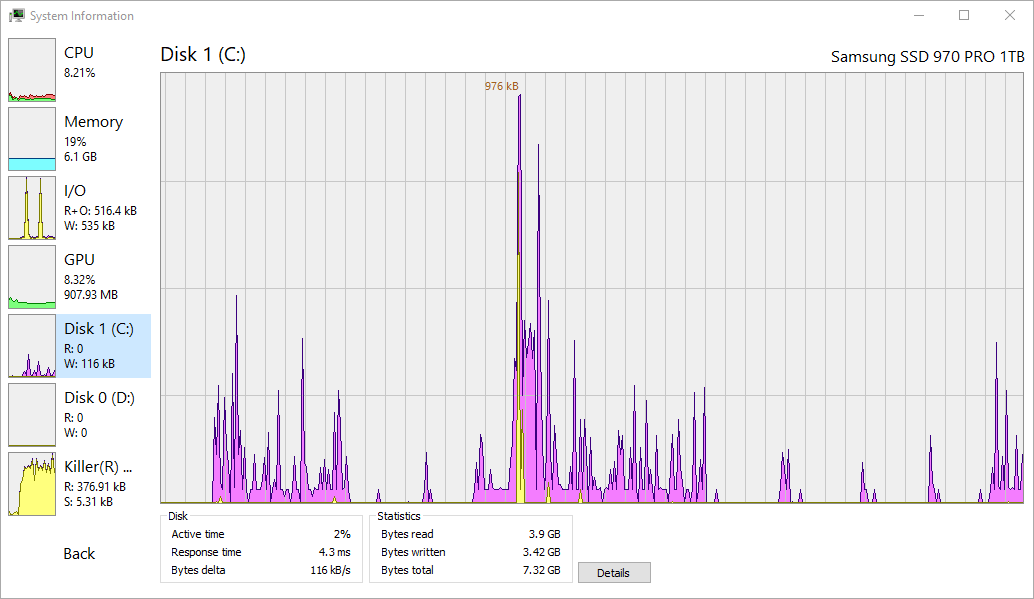
Real-time graphs and statistics help you quickly track down resource hogs and runaway processes. Visualize CPU, memory, disk I/O, and network activity with detailed historical data.

  • Real-time performance graphs
  • Historical data tracking
  • Multi-metric visualization
Debugging Tools

Debugging Tools

View detailed stack traces with kernel-mode, WOW64 and .NET support for advanced debugging. Perfect for developers and system administrators who need deep insights into application behavior.

  • Kernel-mode stack traces
  • .NET debugging support
  • Thread analysis

Why Choose Process Hacker?

The most comprehensive and powerful process monitoring tool for Windows

Superior to Task Manager

More Powerful Than Windows Task Manager

Process Hacker goes far beyond Windows Task Manager, offering advanced features that professional users and system administrators need. While Task Manager provides basic process information, Process Hacker delivers comprehensive system insights.

Detailed Process Information

Complete resource usage, threads, modules, and handles

Network Monitoring

Real-time connection tracking and management

Service Management

Full control over Windows services

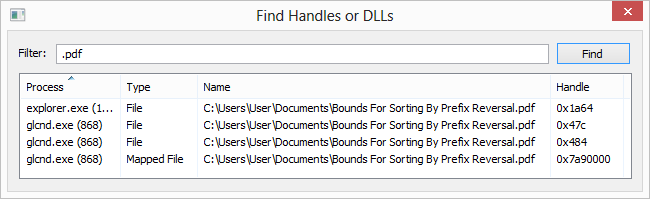
File Handle Discovery

Find which processes lock your files

Stack Trace Viewing

Kernel and user-mode debugging

Disk Activity Monitoring

Track I/O operations per process

Explore all features →
Process Hacker Interface - Main Window
🚀

Lightweight & Fast

Small footprint, minimal resource usage, and lightning-fast performance. Process Hacker runs efficiently without slowing down your system.

🔓

100% Open Source

Completely free and open source under GPL v3. Review the code, modify it, and contribute to the project. No hidden costs or restrictions.

📦

Portable Version

No installation required. Run Process Hacker directly from a USB drive or any folder. Perfect for system administrators and IT professionals.

Who Uses Process Hacker?

Trusted by professionals across different industries

👨‍💼

System Administrators

Monitor server performance, manage services, and troubleshoot system issues efficiently.

👨‍💻

Developers

Debug applications, analyze memory leaks, and profile application performance.

🔒

Security Professionals

Detect malware, analyze suspicious processes, and monitor network activity.

🛠️

IT Support

Resolve user issues, identify problematic processes, and optimize system performance.

Latest Articles & Guides

Learn how to get the most out of Process Hacker with our comprehensive tutorials and guides

🛡️
Security Jan 15, 2026

How to Detect Malware with Process Hacker

Learn how to identify suspicious processes and detect malware using Process Hacker's advanced monitoring features. This comprehensive guide covers everything from identifying suspicious processes to removing threats.

Read More
⚖️
Comparison Jan 10, 2026

Process Hacker vs Process Explorer

Detailed comparison between Process Hacker and Process Explorer. Learn about the differences, similarities, and which tool is better for your needs. Includes feature comparison and use case recommendations.

Read More
🔧
Troubleshooting Jan 5, 2026

Troubleshooting High CPU Usage

Step-by-step guide to identifying and resolving high CPU usage issues using Process Hacker. Learn how to use system graphs, process monitoring, and resource analysis to optimize your system performance.

Read More

What Users Say

Trusted by thousands of users worldwide

★★★★★

"Hands-down the #1 app I install on ANY new Windows installation. CANNOT live without it. This is probably my FAVORITE SOFTWARE OF ALL TIME."

— dragaan, Long-time User

★★★★★

"I created an account just to review this product. I've been going through a hacking situation for over 3 1/2 years and this is so far the single best tool."

— mkultra88, Security User

★★★★★

"Process Hacker is an essential tool for any Windows power user. The ability to see detailed process information in one place is invaluable."

— System Administrator

System Requirements

Compatible with all modern Windows versions

Minimum Requirements

  • Windows 7 or later (32-bit or 64-bit)
  • 512 MB RAM minimum
  • 50 MB free disk space

Recommended

  • Windows 10 or Windows 11
  • 2 GB RAM or more
  • Administrator rights for full functionality

Ready to Get Started?

Download Process Hacker today and take control of your system processes. Join thousands of satisfied users worldwide.

100% Free • No Registration Required • Open Source

No Installation Required
Portable Version Available
Works on Windows 7+